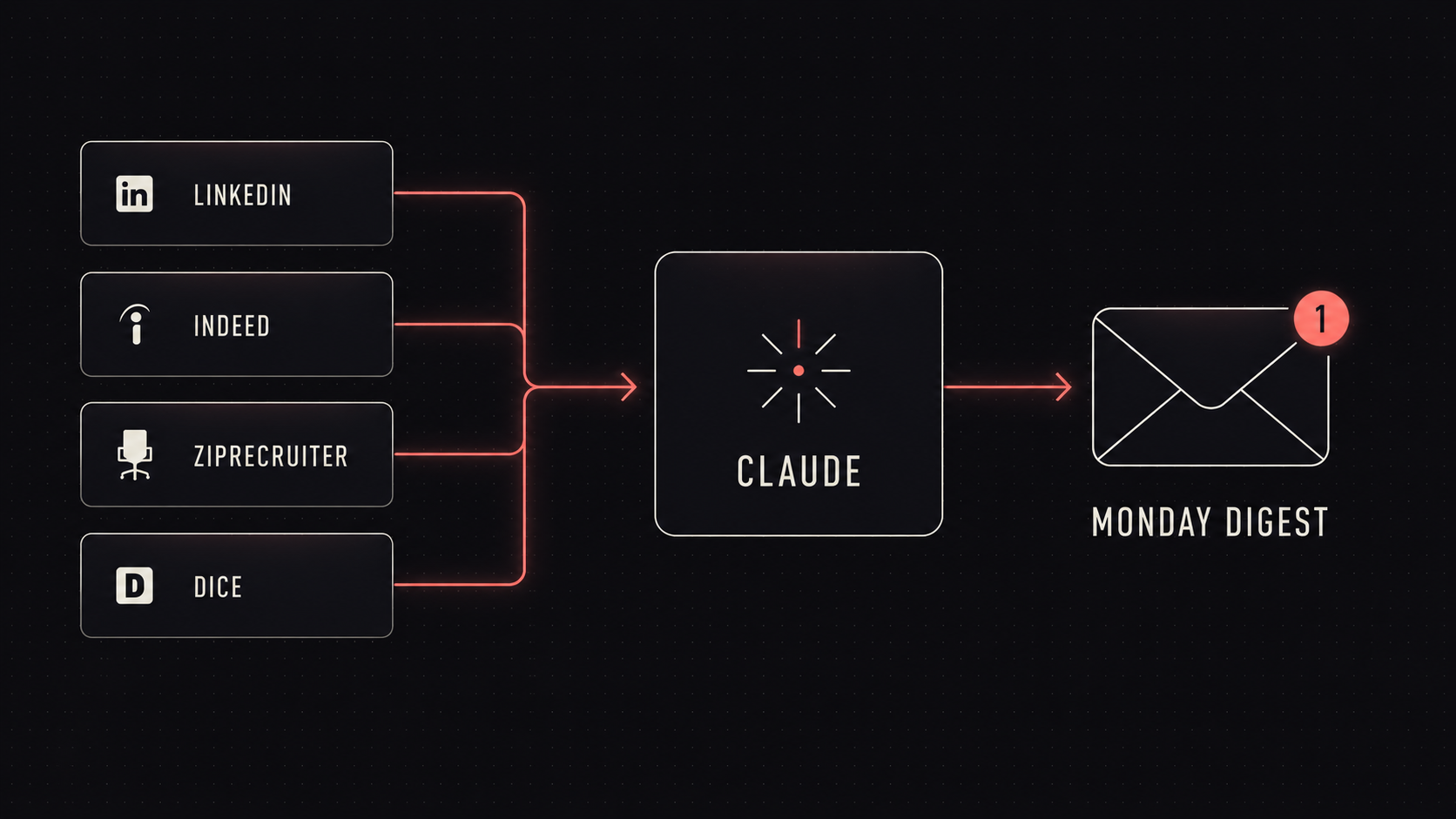
When I started my job search two months ago, I would do the same thing every morning: open LinkedIn, then Indeed, then ZipRecruiter, then Dice. Sometimes I found a role I wanted to apply to. Most of the time, I didn't. Usually, I'd just see the same listings I saw yesterday, the day before, and the day before that.
In my experience, looking for a full-time job is its own full-time job (which is why I usually leave a job before looking for my next one. Reckless, I know, but what can I say? I love chaos). Not only is job searching a full-time job, it's also soul-sucking and time-consuming, and you don't really feel the reward until you actually get a job.
After a couple of weeks of this, I caught myself yelling about it out loud to nobody again (yes, I talk to myself, don't judge me), and I thought: "Why am I doing this manually?"
I've been told, as we all have, that AI is supposed to make everything we do easier and more efficient. There had to be a way to automate this process.
I'd already been using Claude for so many other things, so there had to be a way to use it for my search too. I have specific criteria I'm looking for: remote, salary floor, role fit, type of company. The job boards I check all have public listings. There was no reason this needed to be done by me. Claude has a scheduled tasks feature, so why couldn't I just have Claude do all the work for me automatically?
So I set it up, and honestly, it didn't even take that long.
The concept is simple: I gave Claude my criteria. What I want, what I don't want, my non-negotiables around salary and remote work. Then I pointed it at four job boards: LinkedIn (via an Apify scraper), ZipRecruiter, Indeed, and Dice, the same four sites I was already checking every day. I told Claude to run the scan every Monday at 9 AM and send me a breakdown.
Now, every Monday at 9 AM, Claude is running my search while I'm still sound asleep (I told you, I don't have a job right now, don't judge me). When I wake up, I have a ranked list of 5–10 jobs, each with a summary of the role and why it matches what I'm looking for.
I spend 15 minutes reviewing the list, maybe, marking the ones I want to apply to, and that's it. I'm done. Something I used to spend hours doing every day now takes a few minutes once a week.
Of course, at first it wasn't perfect. Early on, Claude would include roles that were only kind of remote. Companies would label a role "remote" but still expect you to come into the office a couple of days a week, so I had to explicitly filter those out. It also struggled a bit with seniority. I had to spell out "Senior or above, but not Principal/Staff."
Once I got the filtering straightened out, it actually became better than what I was doing manually. Unlike me, Claude doesn't get tired and start skimming past listings. It doesn't get overly optimistic about certain opportunities and add jobs that don't quite fit. It also doesn't downplay my skills and miss opportunities I'd actually be a strong fit for because it doesn't suffer from imposter syndrome. It doesn't get distracted by YouTube or Instagram and forget to check Dice.
I'm still iterating on it and making changes as I go. A couple of future improvements I want to add:
- A "decline reasons" feedback loop so I can train it over time. Right now, if I skip a listing, the next week's digest doesn't know why.
- Some kind of "track which jobs I open vs. ignore" logic so it can learn my patterns.
- Probably bumping it up to twice a week (Monday and Thursday) once the market gets hot again (lol).
Applying for jobs already eats up so much time between applications, screening questions, assessments, take-home projects, interviews, interview prep, and company research. If you're looking for a way to automate even part of that process, this took me maybe an afternoon to set up. It was absolutely worth it.
For the curious: the actual prompt
Here's the actual prompt I use for the scheduled task, with my personal criteria stripped out. Treat it like a scaffold: swap in your own filters, target roles, salary requirements, and preferences.
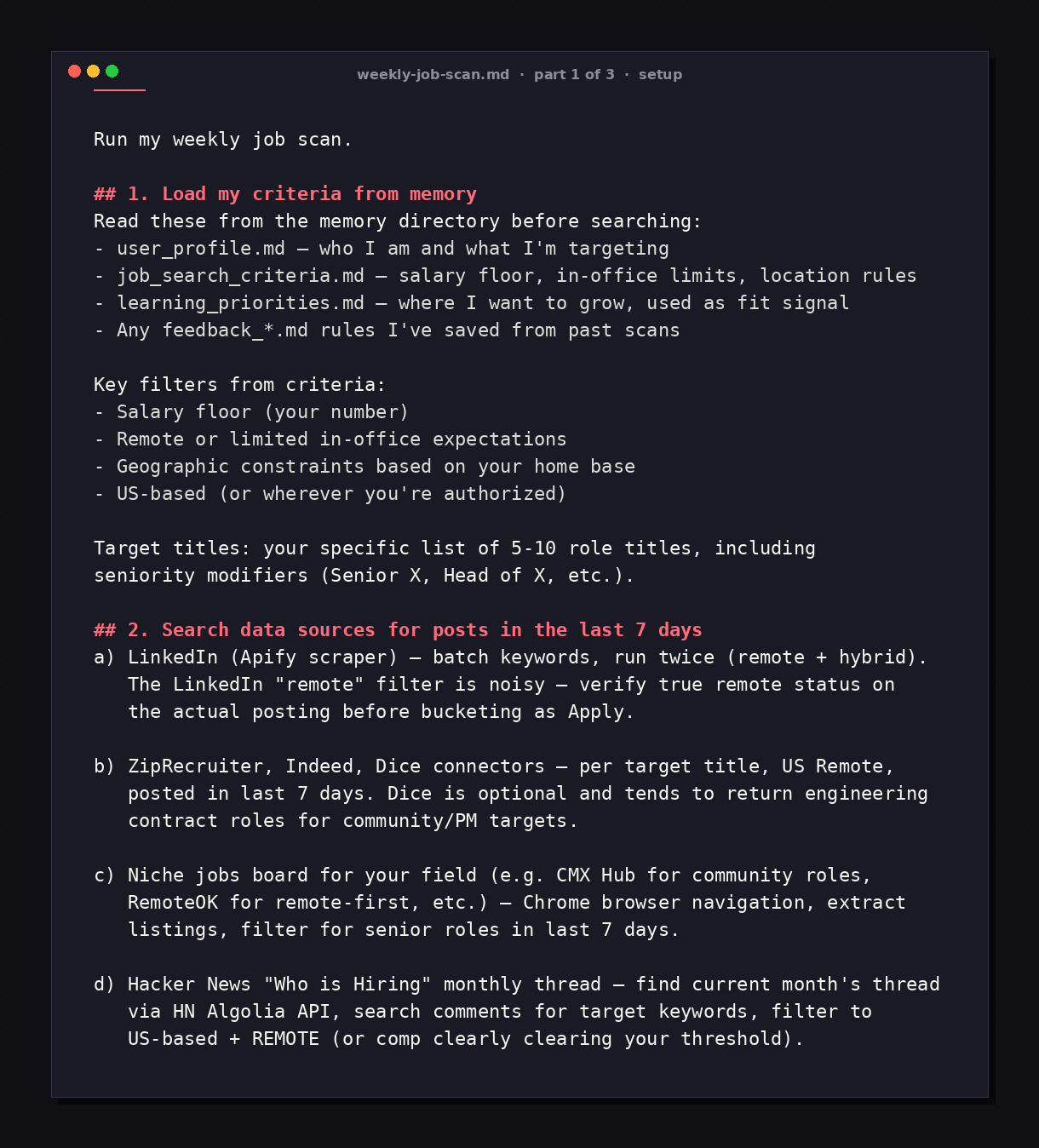
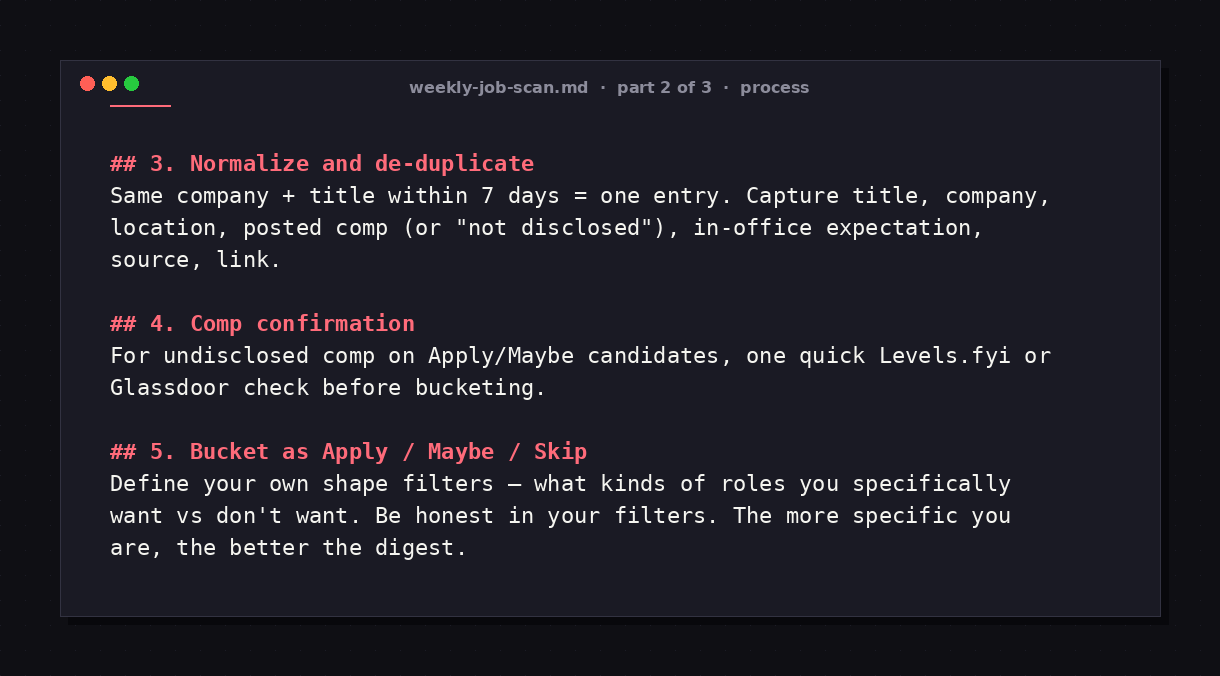
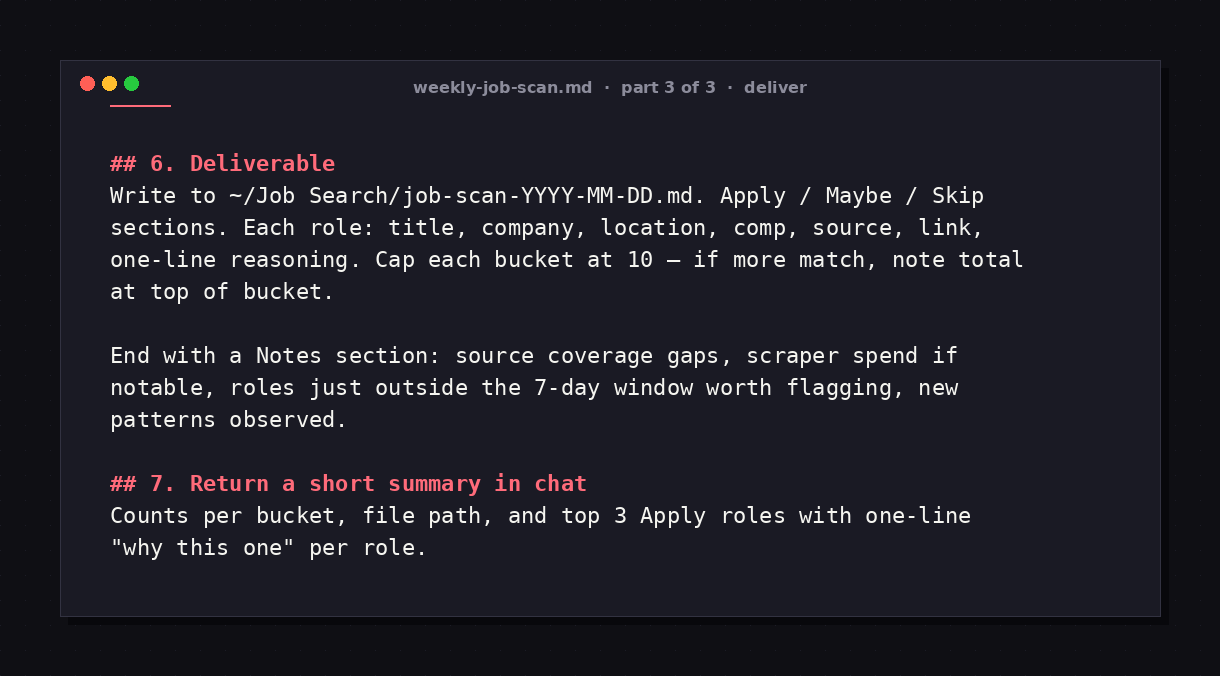
A few things worth knowing if you set this up yourself:
- Memory matters. Storing your criteria in dedicated memory files instead of retyping them every run means Claude can iterate over time and incorporate your feedback, like refining what "remote" actually means to you. Save the edge cases.
- The shape filter is where the magic happens. You can get very specific about the kind of work you don't want, which is often different from the kind of work you do want. Defining the negative space is half the battle.
- Verify the LinkedIn "remote" flag. It lies. Always check the actual posting.
- Iterate weekly. The first 2–3 weeks will probably include some false positives. As you notice patterns, add filters. By week four, the results get dramatically tighter.
- Comp confirmation tools. If a listing doesn't disclose comp, I have Claude check Levels.fyi or Glassdoor before bucketing the role.
If you end up setting this up yourself and want to compare notes, message me on LinkedIn or Bluesky. I'd genuinely love to hear how it works for you.
Update — June 2026: it stopped just finding jobs and started vetting them (and forcing me to network)
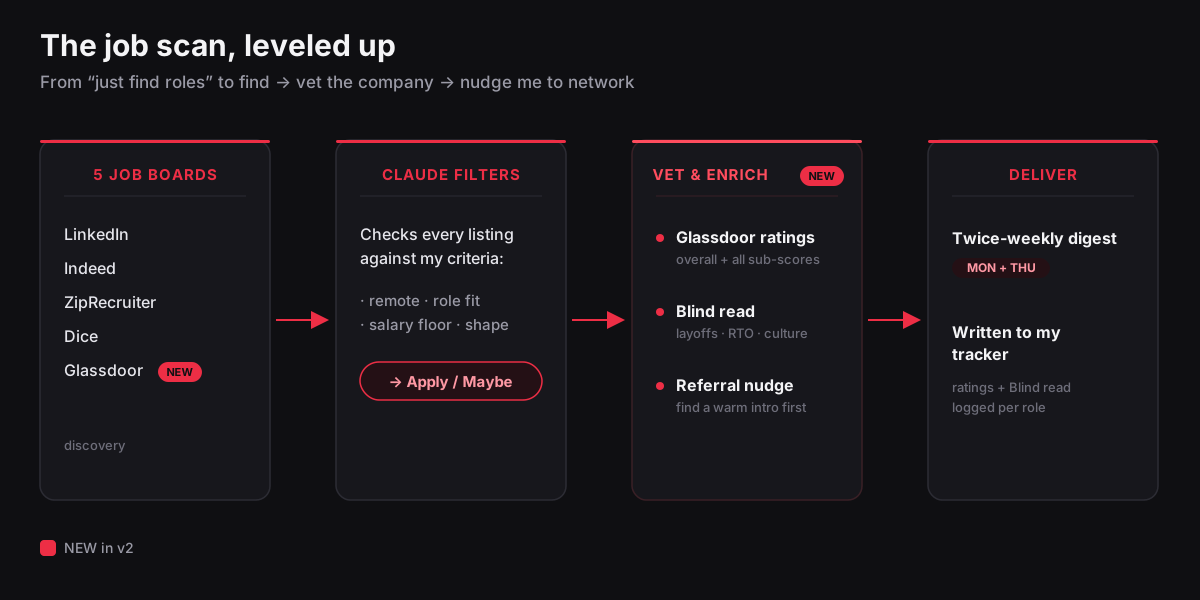
A few weeks after I shipped the first version of this, I kept iterating. Honestly, the scan does more than check four boards every Monday.
1. It vets the company for fit, not just the job
The original version answered "is this role a fit?" but not "do I actually want to work there?" Those are very different questions, and the second one, which I learned from previous experiences, is just as important.
So I gave it two sources that can help inform where I'd like to work:
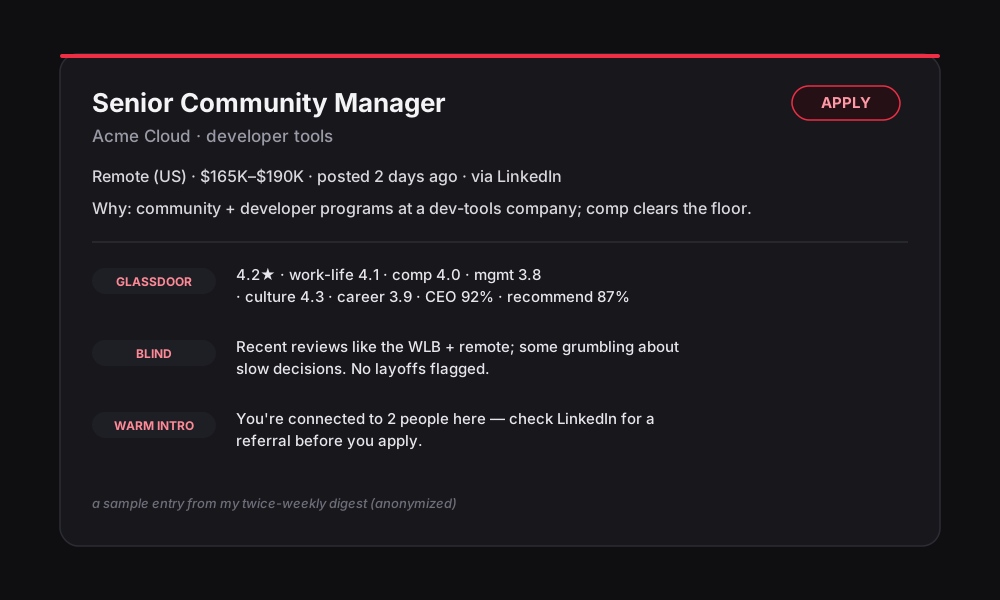
- Glassdoor — but not as a job board. I have it pull the company's overall rating plus the sub-scores I actually care about: work-life balance, compensation & benefits, management, culture & values, career growth, CEO approval, and recommend-to-friend. Now every role in my digest shows up with that breakdown attached, so I get a read on whether people are happy before I spend the rest of my life (or at least an afternoon) on the application.
- Blind — the anonymous employee forum. This is the real $#!+. Layoffs, return-to-office whiplash, whether leadership is a disaster, messy managers, whether the comp listed on the job description is a lie. The scan pulls recent reviews per company and boils them down to a couple of hopefully honest lines.
One week the scan flagged that a company I was about to apply to had quietly done a ~10% layoff a few months earlier. The job posting didn't mention that, obviously. The Glassdoor star average didn't indicate that, but Blind did. I might still apply (because is there a company that hasn't done layoffs recently?) but now I walk in asking the right questions instead of finding that out in the final interview. That's the point.
Two things to point out because I don't want to lie to you: Glassdoor gives me the scores but not the written reviews, and Blind is anonymous people yelling at the internet. So I read it for patterns, not the gospel truth. One salty post isn't data (and I love data). Ten people saying the same thing probably is.
2. It reminds me to "use your referrals girl"
Here's a stat that kept hitting me over the head (mostly from my mom): referred candidates are like 10x more likely to land an interview than cold applicants. And there I was, someone who's organized 7 tech conferences, spoken at plenty of them, and runs a 1,900-member tech community, applying to companies like I don't know a single person in this industry.
So now, for every role it flags as an "apply" or a "maybe", the scan adds a little reminder: check for a 1st- or 2nd-degree connection at this company before you apply. Just a few minutes on LinkedIn before I submit. If I find someone, I reach out (even though it goes against every fiber of my being).
I guess the network I built for everyone else should work for me too. I just have to be told to do it. By a robot. Because this is the world we live in now.
3. The boring stuff
I also bumped it to twice a week (Monday and Thursday, like I threatened to in the original post), added a weekly reminder so the networking actually happens (because like I said it goes against every fiber of my being), and let it write each company's rating and Blind read straight into my tracker.
None of it is glamorous. It just means future-me actually follows through, which is usually not what she's known for (if you're a future employer, that is a joke).
The first version of this job scan helped me find roles. This latest version helps me decide on them, and actually act on them. It turns out that last part is where most of my time was really going. Who knew?